Getting the APSystems API to work
As a solar energy enthusiast, I’ve always been curious about the performance of my solar panel setup. Which panels are pulling their weight? Which ones might be underperforming?
To answer these questions, I decided to dig into the data provided by my inverter’s API. This article will walk you through my journey of analyzing this data, identifying top-performing panels, and understanding the factors that contribute to their efficiency.
My Solar Panel Setup #
Before diving into the data, let me give you an overview of my solar panel setup. I have a 4.6 kW system installed on my roof, consisting of 12 panels. The panels are connected to a micro-inverter as a pair. Six panels on the front of the house face south-west and the others are on the back of the house. Two out of those face north-east, the others are on a flat room and are angled to the south-west as well. The front panels are partially shaded during part of the day due to nearby trees. I chose this setup as a balance between morning and afternoon production.
The inverter is a APSystems DS3-L Micro Inverter, and they are connected to the internet via a Wi-Fi module (the ECU).
Accessing the API #
Previously I extracted data directly by scraping the ECU internal website. That was deliciously hacky, but it worked. Data came at a high resolution of every second. But, I had to store data myself and do aggregations for analysis. I just wanted a simple and easy way to get reliable historical data, and access to the API was the way to go.
APSystems provides an API to access the data from their webservice. I used the APSystems API documentation to get started (I cached it locally for reference). It was a pain to figure out exactly how to derive the signature and build the full request URL. Below are the three calls I use: credentials stay in environment variables, not in the source.
And the results are in! #
I now finally have clear results. There are six panels on the back (north-east): four on a pitched roof and two on a flat roof section tilted to the south-west. On the front there are also six panels, all on a pitched roof facing south-west.
Back side panels #
My main question was: how much does the back side panels produce compared to the front side panels? Was I correct in placing panels on the back side? I was advised they would perform bad, but I pushed ahead anyway. So now I want to know if that paid off.
In total, the back side produces about 85% of what the front side produces. That difference is as expected, as the front is angled towards the high-midday sun. The back side performance was better than I expected.
But not every panel performs equally well. The panels on the flat roof perform much better than the rest, almost as well as the panels on the front side (even though they get some shade from the roof ridge as the sun passes over). On the front side, the lower panels get significant shade from nearby trees. Because of that, they perform almost as “poorly” as the panels on the back side.
It took me three years before I could properly figure this out.
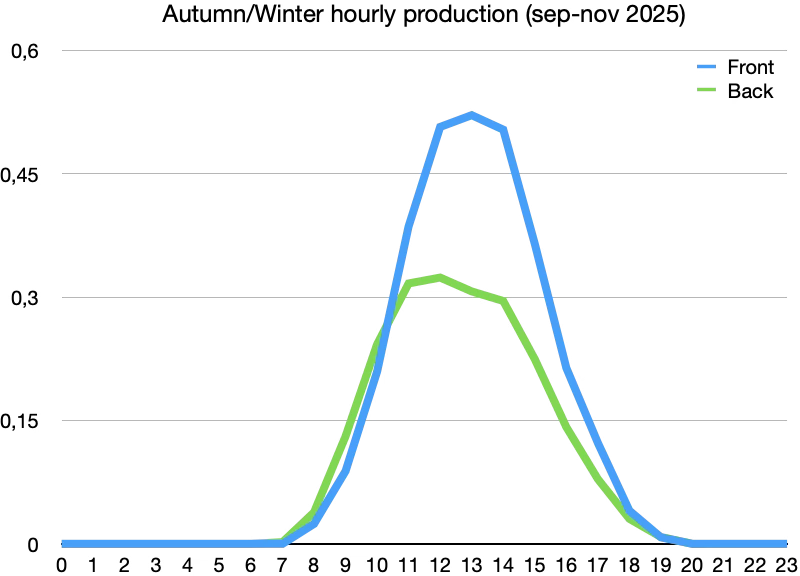
Another thing I was very curious about is the difference between morning and afternoon production. Sadly, I can only go back half a year - and I ran out of quota, so I only got one season.
In the autumn of 2025, the back side panels produced a bit more in the morning, but are already overtaken by the front side panels at 11:00. For the winter I do not have enough data, but the difference seems to be even smaller.
API shell snippets #
Set these before running any snippet (optional variables override defaults shown in the scripts):
APSYSTEMS_APP_ID,APSYSTEMS_APP_SECRET,APSYSTEMS_SYSTEM_IDAPSYSTEMS_INVERTER_IDS— space-separated inverter IDs (only for the per-inverter loop)- Optional:
APSYSTEMS_BASE_URL(defaults to the EMA API host),APSYSTEMS_ENERGY_LEVEL(defaultyearly),APSYSTEMS_DATE_RANGE(default2024) where applicable
Copy-paste on your machine and replace the placeholders with the app id, secret, and system id from the OpenAPI portal (in the app).
export APSYSTEMS_APP_ID="YOUR_APP_ID"
export APSYSTEMS_APP_SECRET="YOUR_APP_SECRET"
export APSYSTEMS_SYSTEM_ID="YOUR_SYSTEM_ID"
# optional:
# export APSYSTEMS_BASE_URL="https://api.apsystemsema.com:9282"
You need openssl and curl on your PATH.
Hourly history: For energy_level=hourly, the API often responds with {"code":1001} for older date_range values, while recent days return code: 0 and per-channel arrays (e1, e2, …). Coarser levels (daily / monthly / yearly) still work for earlier years. In my account, hourly only starts around 2025-09-01 — so I can’t get hour-by-hour for most of summer 2025, but I can cover autumn 2025, winter 2025–26, and early spring 2026 for seasonal comparisons. Plan hourly scripts around whatever window your EMA account actually returns (or collect hourly yourself over time).
Signing (OpenAPI user manual): X-CA-Timestamp must be Unix time in milliseconds (not seconds). X-CA-Nonce must be 32 lowercase hex characters (16 random bytes), not a dashed UUID from uuidgen. The string to sign is timestamp/nonce/appId/{lastPathSegment}/GET/HmacSHA256 where {lastPathSegment} is the inverter id for inverter URLs, or details / energy for those routes.
Per-inverter yearly energy #
This loops over each inverter ID, builds the HMAC-SHA256 signature string that includes that inverter id (as required by the endpoint), and requests inverter energy for the chosen energy_level and date_range (see manual §3.5.2 — date_range format depends on energy_level).
#!/usr/bin/env bash
# Fetch yearly energy per inverter.
set -euo pipefail

: "${APSYSTEMS_APP_ID:?Set APSYSTEMS_APP_ID}"
: "${APSYSTEMS_APP_SECRET:?Set APSYSTEMS_APP_SECRET}"
: "${APSYSTEMS_SYSTEM_ID:?Set APSYSTEMS_SYSTEM_ID}"
: "${APSYSTEMS_INVERTER_IDS:?Set APSYSTEMS_INVERTER_IDS (space-separated inverter IDs)}"

BASE_URL="${APSYSTEMS_BASE_URL:-https://api.apsystemsema.com:9282}"
ENERGY_LEVEL="${APSYSTEMS_ENERGY_LEVEL:-yearly}"
DATE_RANGE="${APSYSTEMS_DATE_RANGE:-2024}"

read -r -a INVERTERS <<< "$APSYSTEMS_INVERTER_IDS"

for INVERTER_ID in "${INVERTERS[@]}"; do
  echo "Fetching data for inverter: $INVERTER_ID"

  TIMESTAMP=$(($(date +%s) * 1000))
  NONCE=$(openssl rand -hex 16)
  SIGNATURE=$(
    echo -n "$TIMESTAMP/$NONCE/$APSYSTEMS_APP_ID/$INVERTER_ID/GET/HmacSHA256" |
      openssl dgst -sha256 -hmac "$APSYSTEMS_APP_SECRET" -binary | base64
  )

  curl -s -X GET "$BASE_URL/user/api/v2/systems/$APSYSTEMS_SYSTEM_ID/devices/inverter/energy/$INVERTER_ID" \
    -H "X-CA-AppId: $APSYSTEMS_APP_ID" \
    -H "X-CA-Timestamp: $TIMESTAMP" \
    -H "X-CA-Nonce: $NONCE" \
    -H "X-CA-Signature-Method: HmacSHA256" \
    -H "X-CA-Signature: $SIGNATURE" \
    -G \
    --data-urlencode "energy_level=$ENERGY_LEVEL" \
    --data-urlencode "date_range=$DATE_RANGE" \
    --data-urlencode "sid=$APSYSTEMS_SYSTEM_ID" \
    --data-urlencode "uid=$INVERTER_ID"
  echo
done
System details #
This hits the systems/details/{systemId} route. The signature string uses the literal segment details so it matches what the server expects for that path.
#!/usr/bin/env bash
# Fetch system details.
set -euo pipefail

: "${APSYSTEMS_APP_ID:?Set APSYSTEMS_APP_ID}"
: "${APSYSTEMS_APP_SECRET:?Set APSYSTEMS_APP_SECRET}"
: "${APSYSTEMS_SYSTEM_ID:?Set APSYSTEMS_SYSTEM_ID}"

BASE_URL="${APSYSTEMS_BASE_URL:-https://api.apsystemsema.com:9282}"
ENERGY_LEVEL="${APSYSTEMS_ENERGY_LEVEL:-yearly}"
DATE_RANGE="${APSYSTEMS_DATE_RANGE:-2024}"

TIMESTAMP=$(($(date +%s) * 1000))
NONCE=$(openssl rand -hex 16)
SIGNATURE=$(
  echo -n "$TIMESTAMP/$NONCE/$APSYSTEMS_APP_ID/details/GET/HmacSHA256" |
    openssl dgst -sha256 -hmac "$APSYSTEMS_APP_SECRET" -binary | base64
)

curl -s -X GET "$BASE_URL/user/api/v2/systems/details/$APSYSTEMS_SYSTEM_ID" \
  -H "X-CA-AppId: $APSYSTEMS_APP_ID" \
  -H "X-CA-Timestamp: $TIMESTAMP" \
  -H "X-CA-Nonce: $NONCE" \
  -H "X-CA-Signature-Method: HmacSHA256" \
  -H "X-CA-Signature: $SIGNATURE" \
  -G \
  --data-urlencode "energy_level=$ENERGY_LEVEL" \
  --data-urlencode "date_range=$DATE_RANGE"
echo
Total system energy #
This requests aggregated energy for the whole system (systems/{systemId}/energy). The signing string uses the energy segment, distinct from the details call above.
#!/usr/bin/env bash
# Fetch total system energy.
set -euo pipefail

: "${APSYSTEMS_APP_ID:?Set APSYSTEMS_APP_ID}"
: "${APSYSTEMS_APP_SECRET:?Set APSYSTEMS_APP_SECRET}"
: "${APSYSTEMS_SYSTEM_ID:?Set APSYSTEMS_SYSTEM_ID}"

BASE_URL="${APSYSTEMS_BASE_URL:-https://api.apsystemsema.com:9282}"
ENERGY_LEVEL="${APSYSTEMS_ENERGY_LEVEL:-yearly}"

TIMESTAMP=$(($(date +%s) * 1000))
NONCE=$(openssl rand -hex 16)
SIGNATURE=$(
  echo -n "$TIMESTAMP/$NONCE/$APSYSTEMS_APP_ID/energy/GET/HmacSHA256" |
    openssl dgst -sha256 -hmac "$APSYSTEMS_APP_SECRET" -binary | base64
)

curl -s -X GET "$BASE_URL/user/api/v2/systems/$APSYSTEMS_SYSTEM_ID/energy" \
  -H "X-CA-AppId: $APSYSTEMS_APP_ID" \
  -H "X-CA-Timestamp: $TIMESTAMP" \
  -H "X-CA-Nonce: $NONCE" \
  -H "X-CA-Signature-Method: HmacSHA256" \
  -H "X-CA-Signature: $SIGNATURE" \
  -G \
  --data-urlencode "energy_level=$ENERGY_LEVEL"
echo